Your terminal wasn't built for agents.
Prowl is.

You're not typing commands any more. You're running Claude Code in one branch, Codex in another, and a third agent on a migration, and the hard part is knowing who needs you next. Prowl is a native macOS terminal built around exactly that: many agents, many worktrees, all legible at a glance.

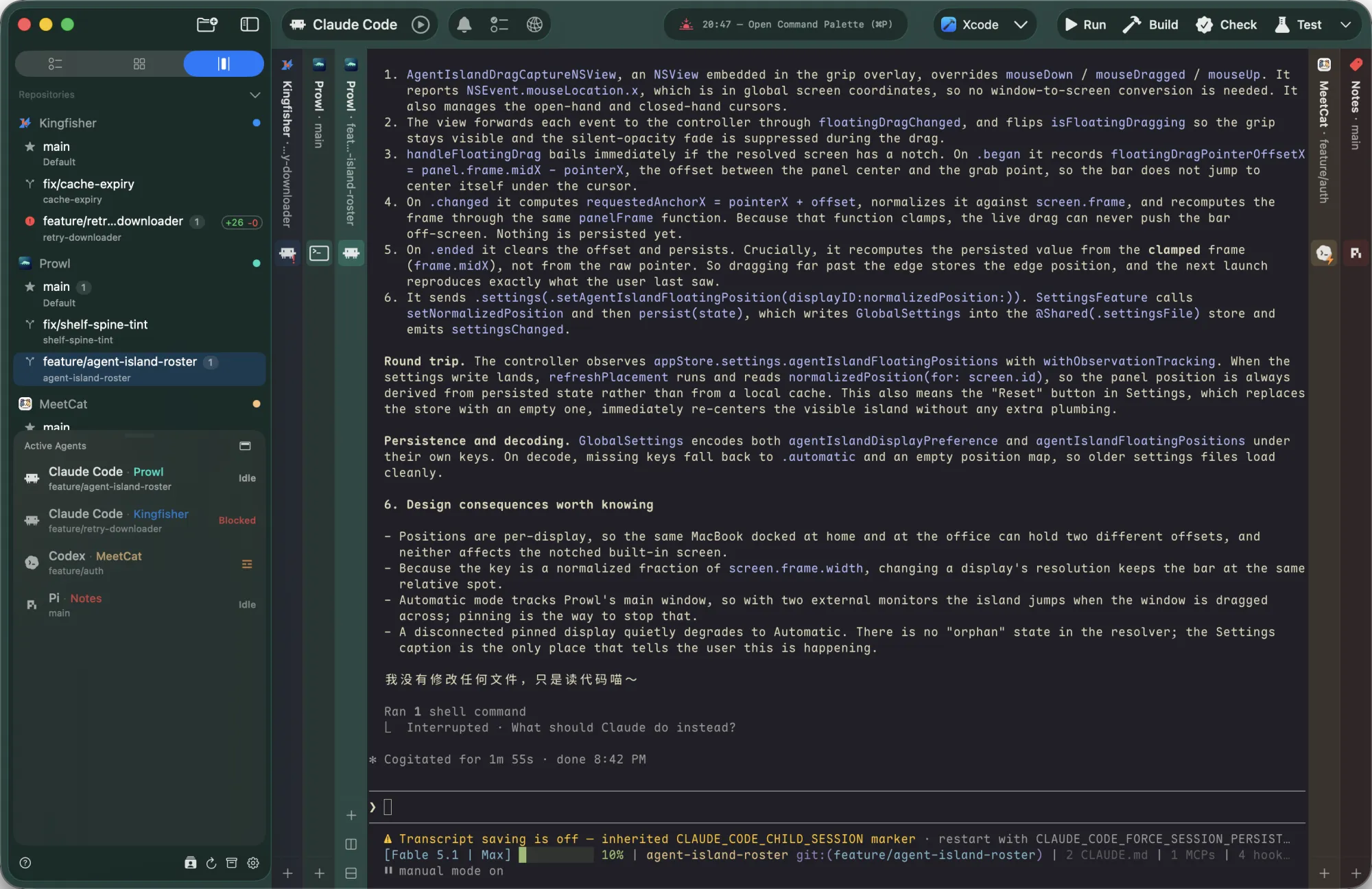
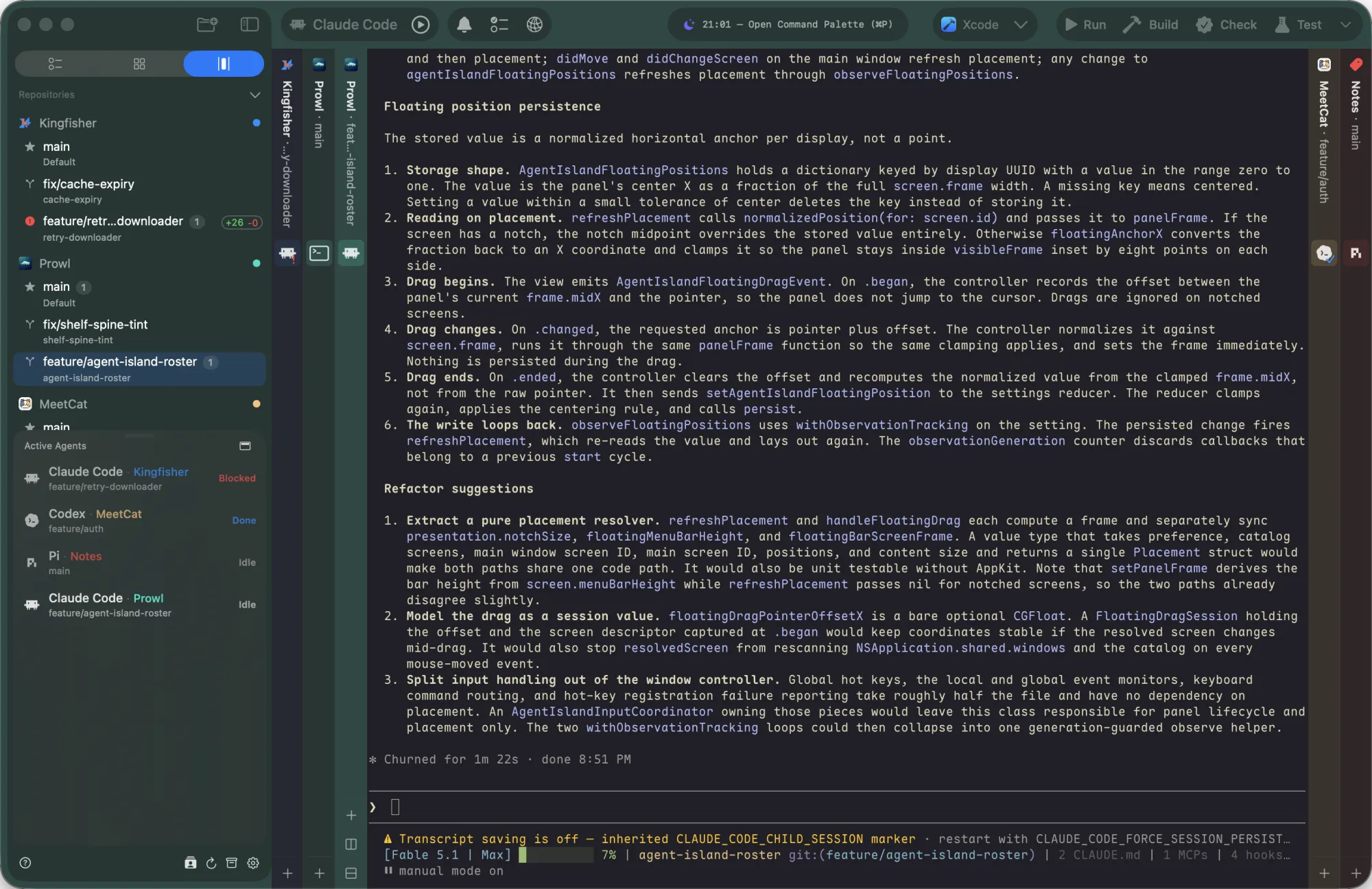
Prowl in Shelf view with the Prowl book open and mint-tinted chrome, Kingfisher, MeetCat and Notes as closed spines, and the Active Agents panel showing Blocked, Done and Idle agents

Three ways to look at the same fleet.

Repositories hold worktrees, worktrees hold tabs, tabs hold panes. Prowl lays that hierarchy out three ways, and switching never touches your running sessions.

Canvas

Every open tab becomes a card on a zoomable board. Each card is a live, fully interactive terminal, so you watch several agents work at once and click into any of them to type.

  • Broadcast. ⌘-click cards or press ⌘⌥A to select them, then type once. “Run the tests”, “commit”, /clear: delivered to every selected agent.
  • Tile, arrange, organize. ⌘⌥T resizes cards to fill the window like a tiling window manager; ⌘⌥R packs them; ⌘⌥G resets a uniform grid.
  • Finished cards light up. A card whose task just completed turns its title bar orange until you look at it.
  • Spatial keys. ⌘⌃← ⌘⌃→ ⌘⌃↑ ⌘⌃↓ jump to the nearest card in that direction; ⌘⌥E expands one to fill the viewport.

Toggle with ⌘⌥↩ · Canvas in the manual
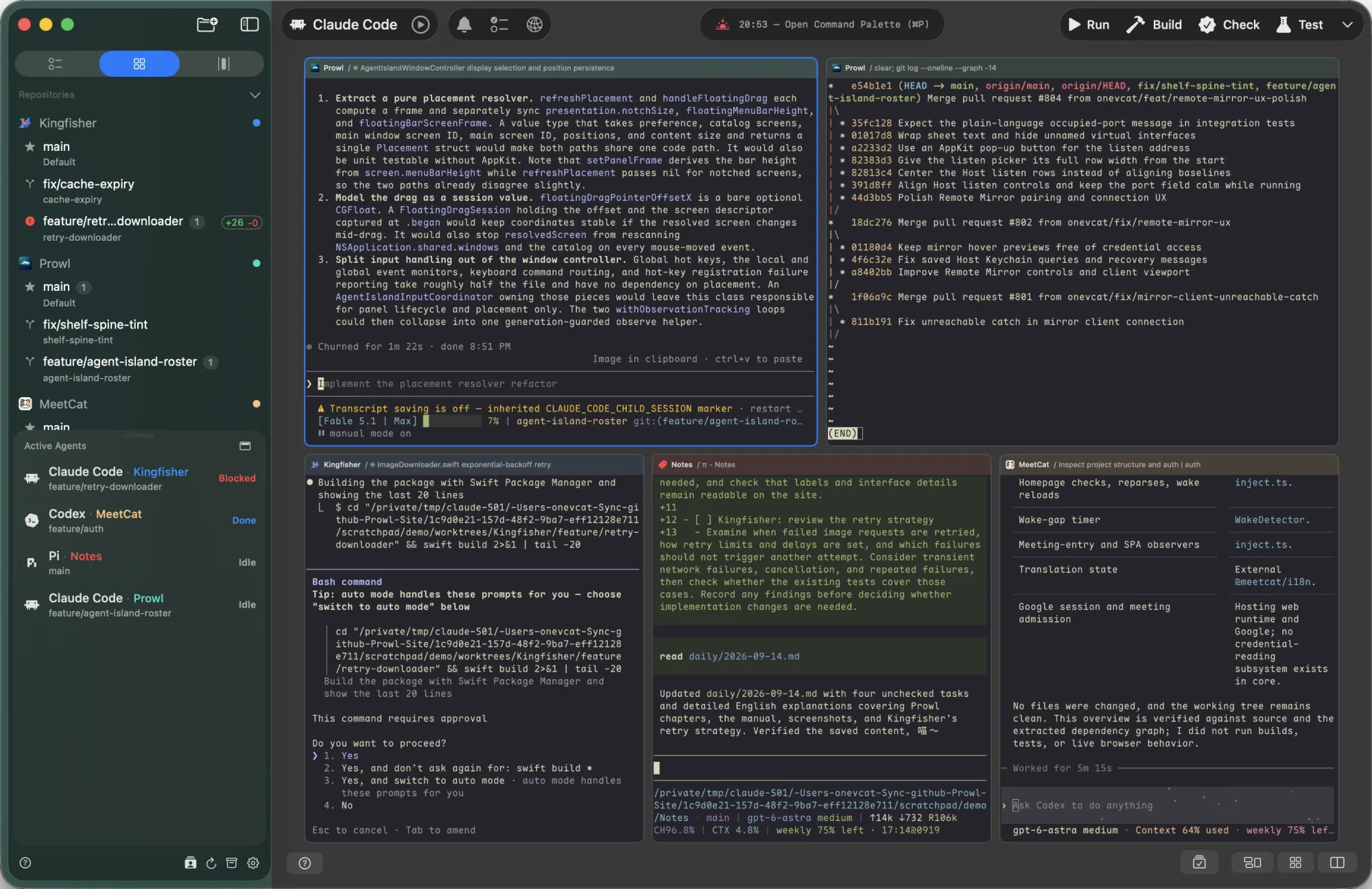
Canvas view with agent terminals tiled as cards

Shelf

Worktrees stand on the sides as vertical spines, like books on a shelf. One book is open in the middle; the rest wait, brighter when near and fading with distance, so you always know where you are in the stack.

  • Flip books. ⌘⌃← / ⌘⌃→ move between worktrees, ⌥⌃1⌥⌃9 jump straight to one.
  • Cycle tabs. ⌘⌃↑ / ⌘⌃↓ walk the open book's tabs; hold and two-finger swipe for the same on the trackpad.
  • Status on the spine. Each tab slot carries the agent's state marker, so a blocked agent is visible from any book.
  • Colour follows the repository. Spines and window chrome pick up the repo's colour.

Toggle with ⌘⇧↩ · Shelf in the manual

Shelf view with worktree spines on both sides and one open terminal

Sidebar, worktrees, splits

The default view: repositories and their git worktrees down the left, the focused worktree's tabs and splits on the right. One branch per agent, each in its own directory, all live on disk at once.

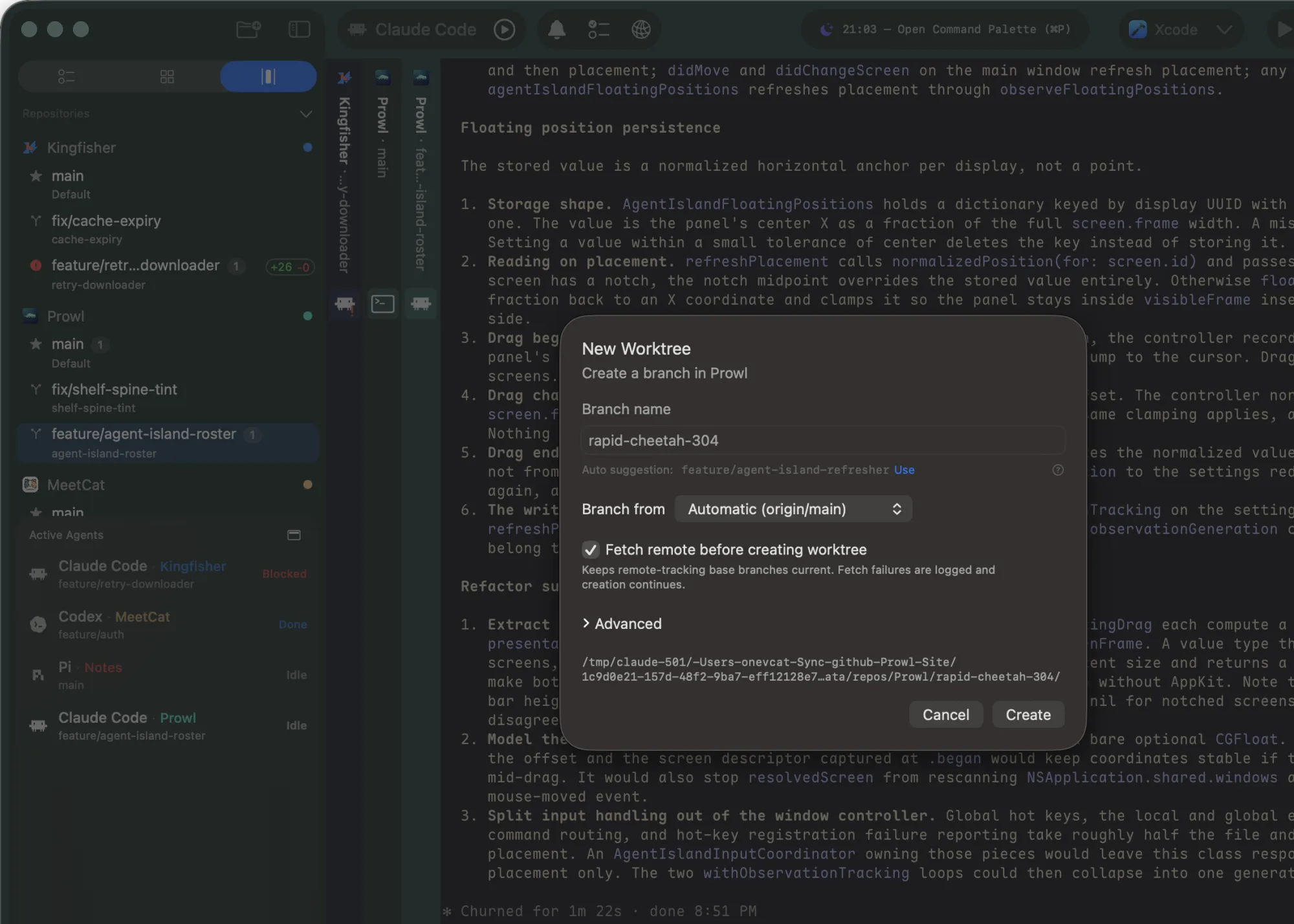
  • New worktree in one keystroke. ⌘N asks for a branch name (or suggests one on-device with Apple Intelligence), picks the base ref, and can copy ignored or untracked files across.
  • Scripts on lifecycle. A Setup Script runs after creation, an Archive Script before archiving. Both get PROWL_WORKTREE_PATH and PROWL_ROOT_PATH.
  • Rows tell the story. Line-change badges, pull-request state, an unread bell, a spinner while an agent works, a red mark when one is blocked.
  • Splits and history. ⌘⌥←→↑↓ move between panes, ⌘⌥⇧F zooms one, ⌘⌥[ / ⌘⌥] step back and forward through the worktrees you visited.

Repositories & worktrees · Terminal

The New Worktree sheet with an on-device branch name suggestion, over a Claude Code session; the sidebar row shows a +26 line-change badge

Workspaces

Some tasks span an app, its API, and a shared package. A workspace is one folder that links several repositories, so a single agent starts at the root and can work across all of them in one session.

  • Declared, not guessed. .prowl/workspace.json lists each repository, its role, and the branch expected for the task. Agents read it as the contract.
  • Mix sources. Link a repository you already opened, create a fresh branch as a new worktree, or clone a remote straight into the workspace.
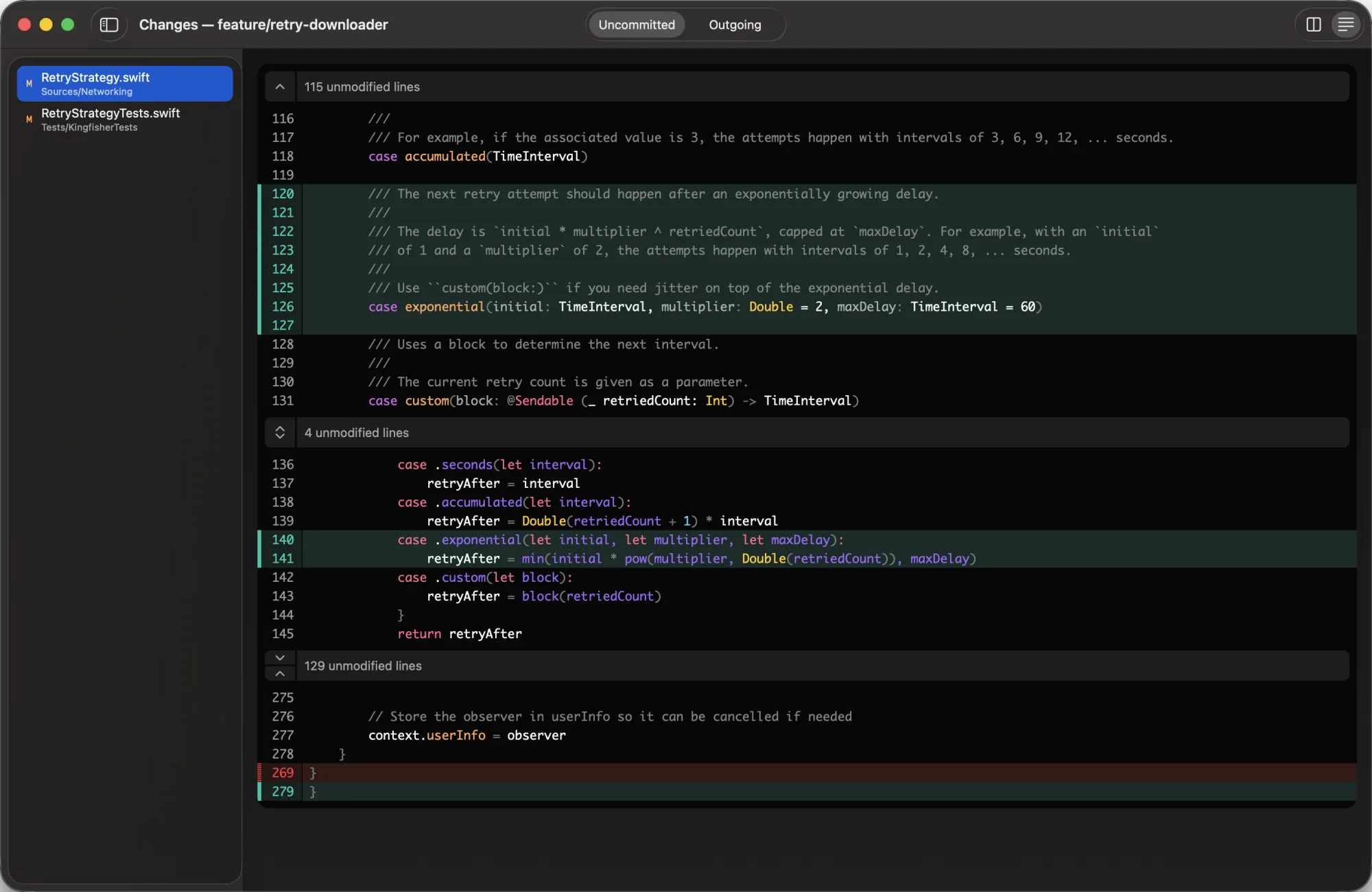
  • Per-repository review. Child rows show their own branch, line counts and PR badge; diff and outgoing changes open per child.

Workspaces in the manual

// checkout-flow/.prowl/workspace.json
{
  "schema_version": "prowl.workspace.v1",
  "title": "Checkout Flow",
  "description": "Update app UI, API contract, and shared package together.",
  "repositories": [
    { "name": "App",    "role": "macOS app", "path": "app",
      "source_kind": "local_repository", "branch_name": "codex/checkout-flow" },
    { "name": "API",    "role": "backend",   "path": "api",
      "source_kind": "remote", "base_ref": "main" },
    { "name": "Shared", "role": "library",   "path": "shared-package",
      "source_kind": "existing_path" }
  ]
}

Know who needs you.

With several agents in flight the bottleneck is not running them, it is knowing where to look next. Prowl watches every pane, names the state, and puts the one that needs you within a glance or a single key.

Active Agents

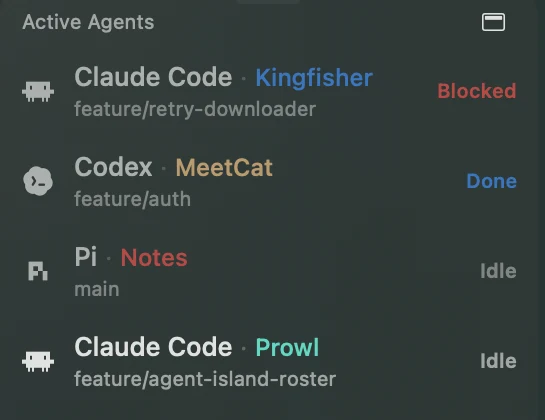
A live roster of every agent across every worktree, tab and split, each row colour-coded by state. Click a row to land in that agent's pane.

  • Working is processing.
  • Blocked is waiting on you: a permission or confirmation prompt. This is the one to surface first.
  • Done finished and you have not looked yet. It becomes Idle once the pane is actually in front of you.
  • Idle nothing running.
  • ⌥⌃↑ / ⌥⌃↓ cycle through agents from the keyboard; ⌘⌥P shows or hides the panel.
  • Right-click a row to run a workflow with that agent, mark it read, or reveal its native session log in Finder.

Active Agents in the manual

Active Agents panel listing Claude Code, Codex and Gemini with Working, Blocked, Done and Idle states

Agent Island

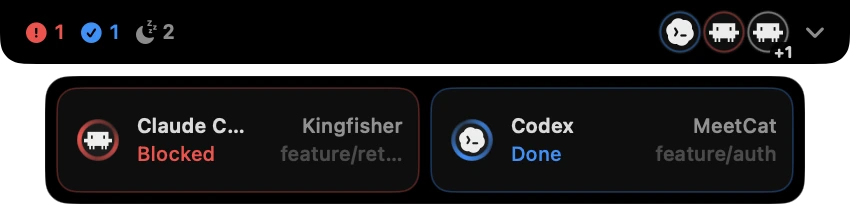
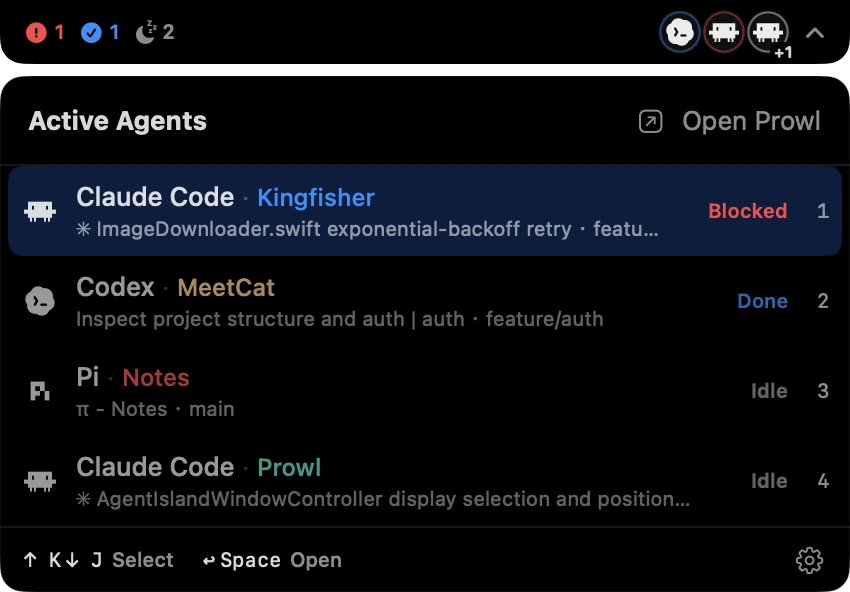
The same roster, projected to the top of your display so it stays visible while another app is in front. On a notched Mac it wraps the camera; elsewhere it floats over the menu bar.

  • Counts by state, in attention order: blocked, done, working, idle, with the runtime icons of the agents behind them.
  • Blocked and Done cells drop below the bar the moment they happen. Click one and Prowl comes forward on exactly that pane.
  • Muscle-memory navigation. Assign Toggle Agent Island and use it from any app: arrows or j/k to move, 19 to pick, to jump.
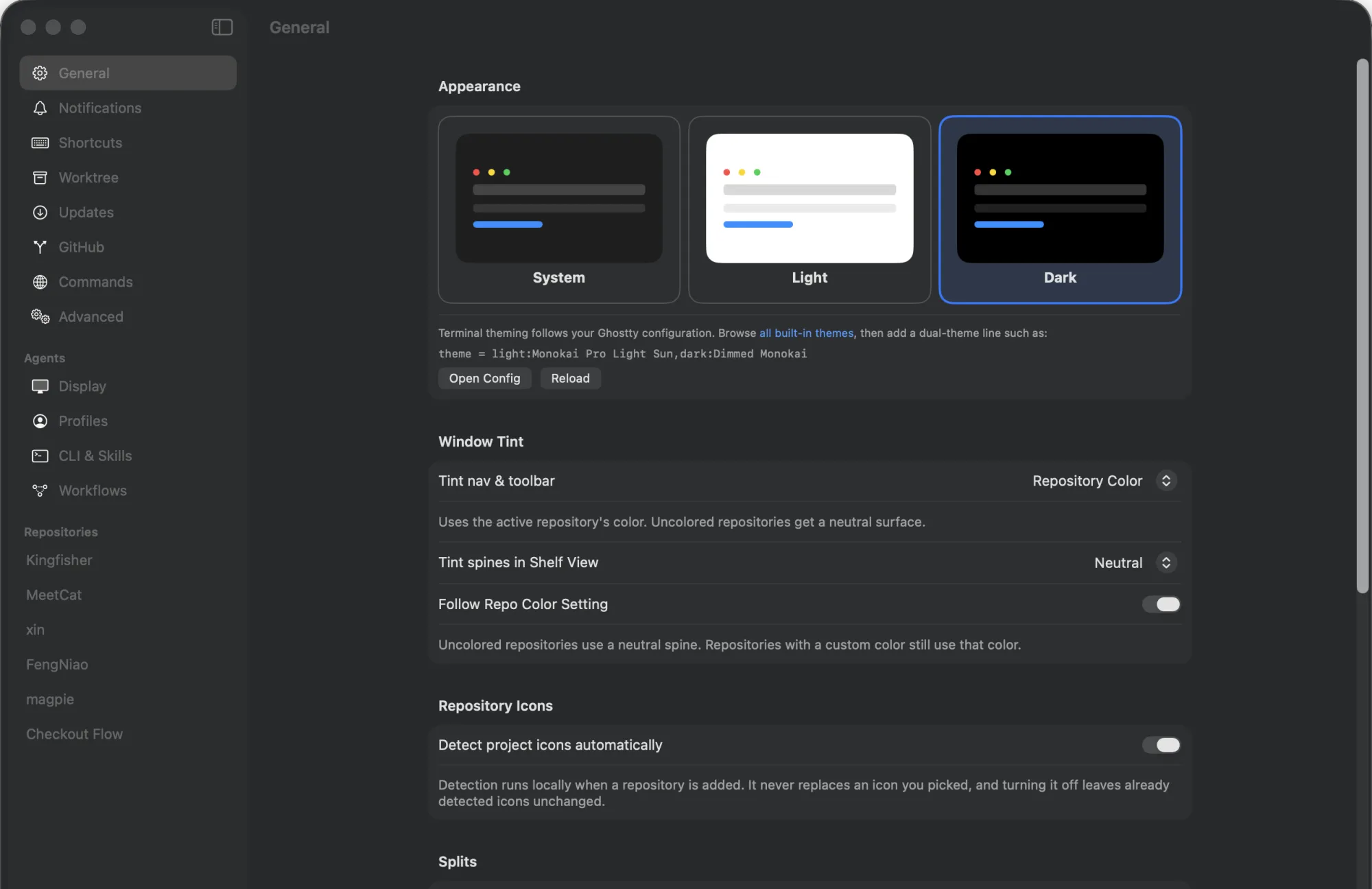
  • Quiet by default. Off until you enable it in Settings → Agents → Display; a floating bar fades to a chosen opacity when idle.

Agent Island in the manual

Agent Island bar showing one blocked, one done and two idle agents, with Blocked and Done cells below it Agent Island expanded roster listing four agents with their state and 1–4 shortcuts

Agent Profiles

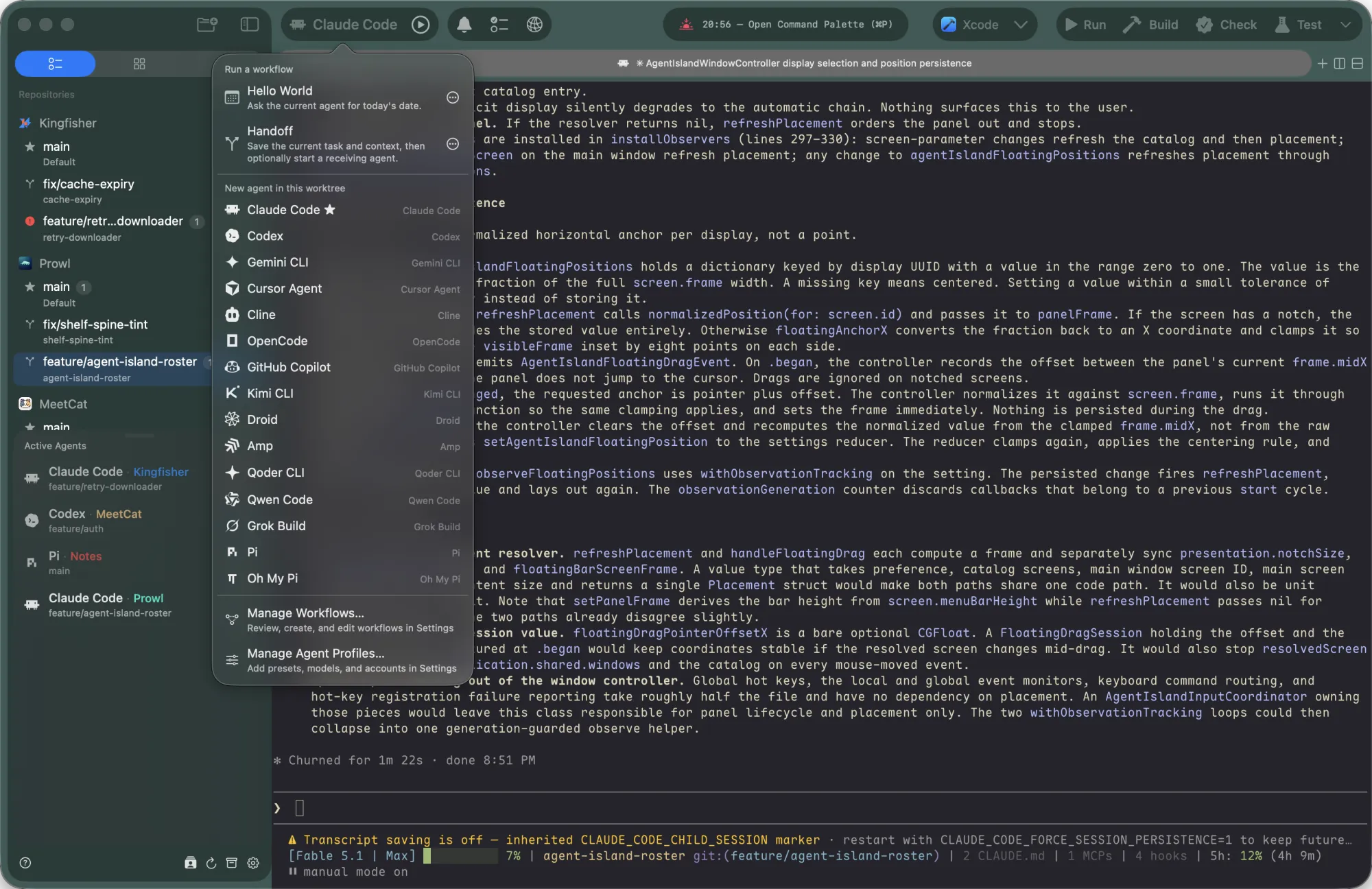
Named launch presets: a runtime, a model, a reasoning effort, an execution mode, and where the pane opens. One click in the toolbar's Agents menu starts a fresh agent in the current worktree exactly the way you want it.

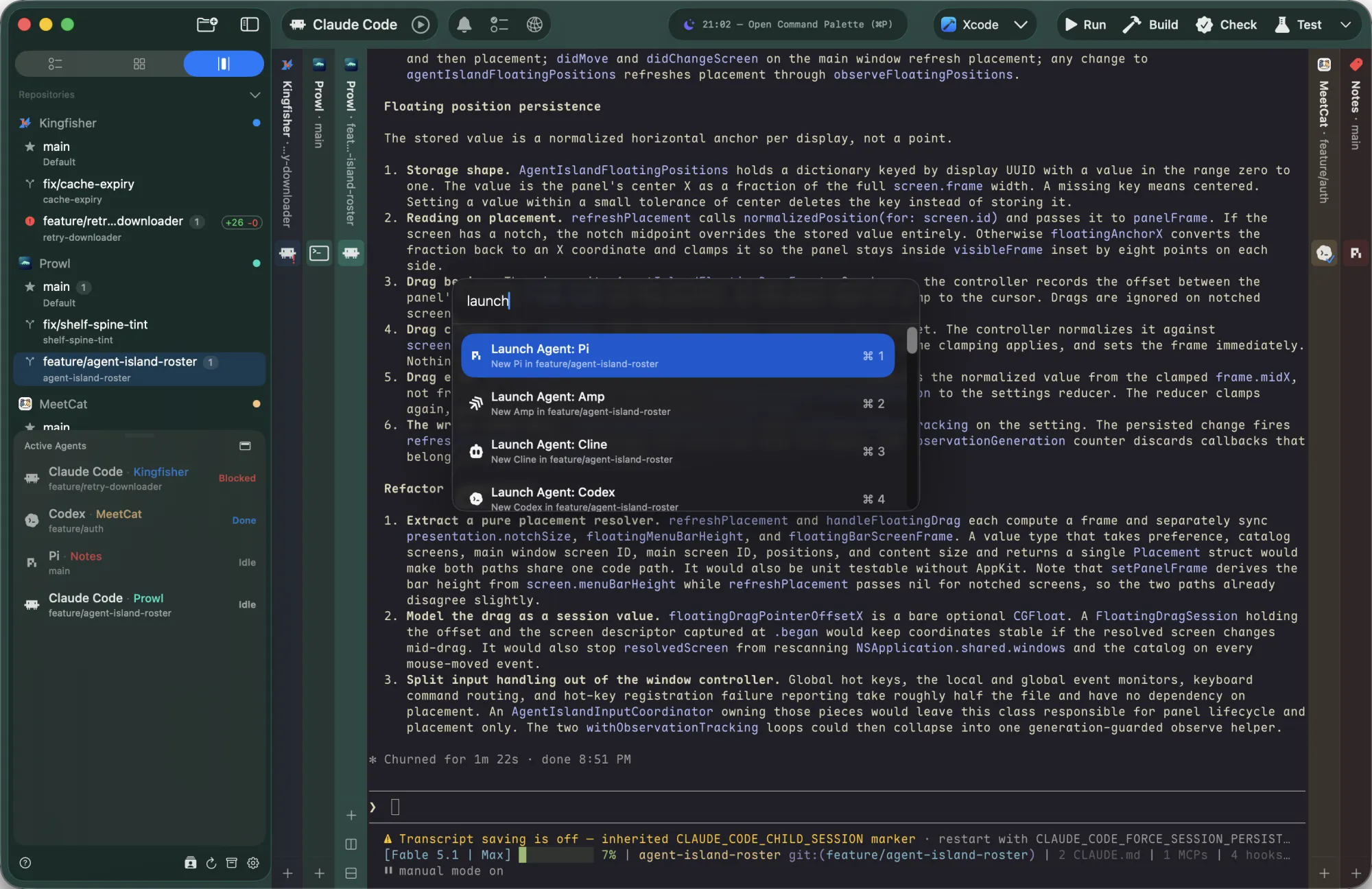
  • Launch anywhere. The toolbar capsule, its quick-launch button for the recommended profile, ⌘P “Launch Agent”, or prowl create tab --profile from a script.
  • Environment overrides per profile. Point one profile at a different API endpoint and key. Values never appear in the typed command or shell history.
  • Dedicated home. Give a profile its own runtime home for a second account, separate skills and separate session history.
  • Runtime-aware. Only the fields that CLI actually supports are shown; a launch preview shows the exact invocation.

Agent Profiles in the manual

The toolbar Agents menu open: a Run a workflow section with Hello World and Handoff, then one launch row per Agent Profile for fifteen runtimes

Detection & completion signals

Prowl recognises the agent in a pane from its process, then reads the live status region of its screen to decide Working, Blocked or Idle. Agents launched from a Profile also get native completion hooks, so “the turn ended” is a fact, not a guess.

  • Fifteen runtimes recognised, through wrappers like node and bun too.
  • Runtime-specific heuristics: Claude's status block, Codex's footer and session logs, Pi's braille loader, Copilot's pickers; a permission prompt reads as Blocked, a spinner as Working.
  • Native hooks on launch for Claude Code, Codex, Copilot, Droid, Qoder, Pi, Oh My Pi and OpenCode, without writing to your runtime configuration.
  • Explainable. prowl agents --json reports the rule behind every state.

Agent detection in the manual

  • Claude Code
  • Codex
  • Gemini CLI
  • Cursor Agent
  • Cline
  • OpenCode
  • GitHub Copilot
  • Kimi Code
  • Factory Droid
  • Amp
  • Qoder CLI
  • Qwen Code
  • Grok Build
  • Pi
  • Oh My Pi

Reminders

Walk away. When an agent finishes, or stops to ask you something, Prowl posts a macOS notification, badges the Dock, and floats that worktree to the top of its section.

  • Unread everywhere. A bell on the worktree row, a badge on the toolbar bell, an orange spine slot in Shelf, an orange title bar in Canvas.
  • Jump to it. ⌘⌥U takes you to the latest unread pane.
  • Long commands too. Anything that runs past ten seconds can notify when it exits, unless you were typing in that pane.
  • Never for the pane you are watching. Notifications from the focused, visible pane stay quiet.

Notifications in the manual

Your routine, one keystroke.

The same build, the same tests, the same “review this and hand it off” loop, every day. Prowl turns the small ones into buttons and the big ones into workflows it runs for you.

Custom Commands

Pin swift build, npm test or claude -p "review the diff" to a toolbar button with an icon and a hotkey. Define them once globally, or per repository.

  • Three ways to run. As a shell script in a new tab, typed into the focused pane, or in a split next to it. Optionally close the tab when it exits cleanly.
  • Hotkeys win. A command's shortcut takes precedence over app shortcuts; conflicts are caught while you record the key.
  • Also: Run Script. One per repository on ⌘R, stopped with ⌘., plus Setup and Archive scripts that fire on worktree lifecycle.
  • Everything appears in ⌘P and the Worktrees menu too.

Custom actions in the manual

Toolbar with Run, Build, Test and Review command buttons

Agent Workflows

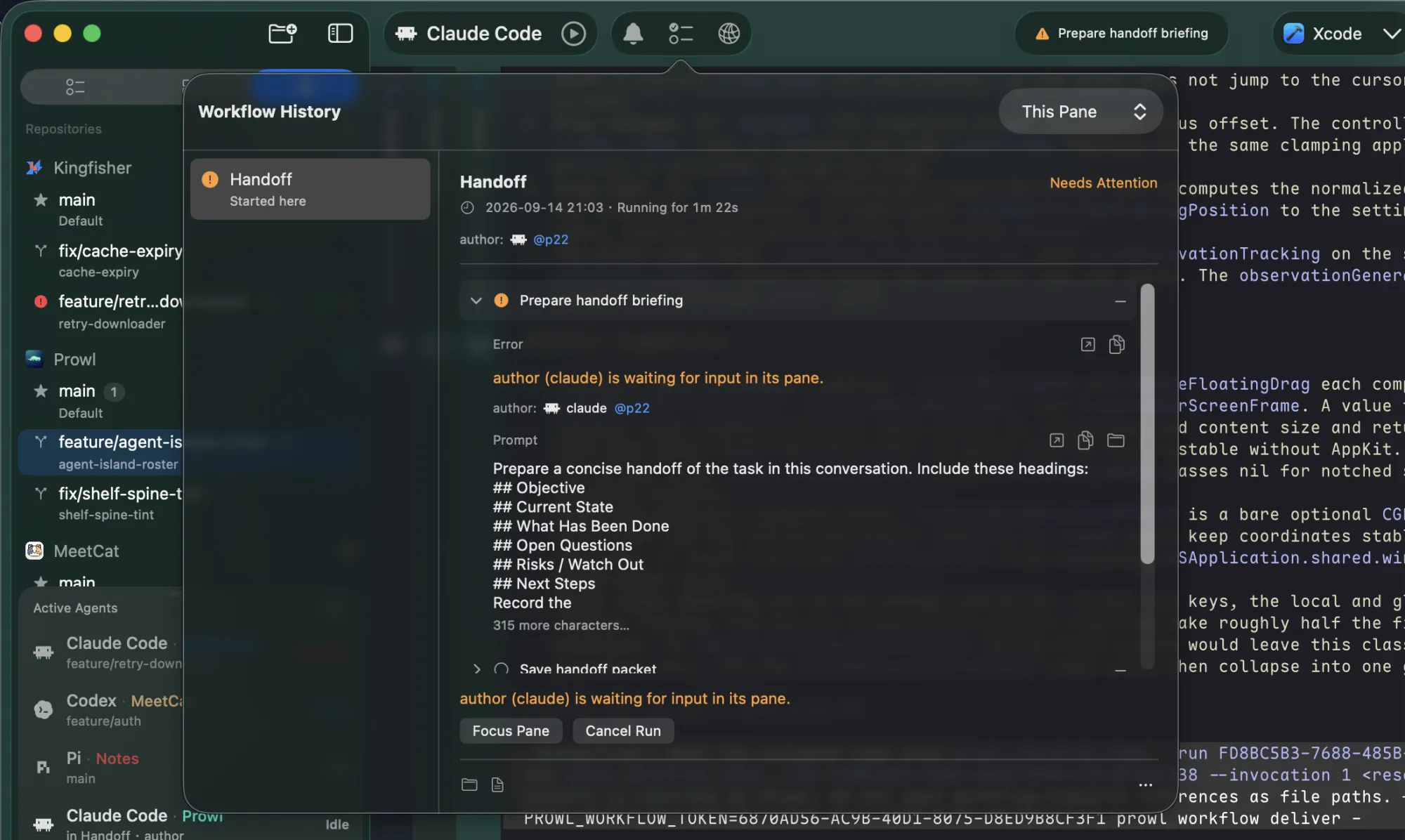
A workflow scripts several live agents: who takes part and what happens in order. Prowl types the instructions into the right panes, waits for each delivery, and shows the run in the toolbar.

  • Start from anywhere: ⌘P, the Agents menu, an Active Agents row, or prowl workflow run.
  • Supervised. The toolbar shows the current step and flags when a run needs you: nudge, retry, relaunch, accept, skip or cancel.
  • Workflow History keeps every prompt, delivery and script output for three days.

Workflows in the manual

Workflow History panel over a Handoff run that needs attention, with the Prepare handoff briefing step expanded and Focus Pane / Cancel Run actions; the toolbar shows the run's status item

Writing a workflow

A .pwlworkflow bundle holds a workflow.yaml: roles, steps and typed state. Keep it in ~/.prowl/workflows, or in the repository's .prowl/workflows so it travels with the code.

  • Roles: current (the pane you start from), launch (a Profile Prowl starts), pick (an agent you choose).
  • Steps: message, launch, if, while, action, notify, close; a step can expect a delivery with a verdict.
  • Validated first. prowl workflow validate; the bundled prowl-workflow skill teaches an agent the DSL.

Authoring reference

# review-loop.pwlworkflow/workflow.yaml
schema: prowl.workflow/v1
id: review-loop
name: Adversarial review
roles:
  author:   { source: current }
  reviewer: { source: launch, suggest: Reviewer }
steps:
  - id: brief
    message: author
    prompt: Summarise the change you just made.
    expect: { delivery: brief }
  - id: review
    launch: reviewer
    prompt: Review {{ deliveries.brief.path }} against the diff.
    expect: { delivery: findings, verdicts: [clean, issues] }
  # … a while loop re-messages both roles until the verdict is clean
  - id: done
    notify: Review finished with verdict {{ deliveries.findings.verdict }}

Handoff

Context is the expensive part. The built-in Handoff workflow asks the current agent to write a briefing, saves it with repository and session context, and can launch a receiving agent in a new tab to continue from there.

  • A packet, not a prompt. Objective, current state and next steps land in .prowl/handoff/, with an immutable copy per run.
  • Any runtime to any runtime. Claude to Codex, Codex to Pi: the receiver is just a Profile.
  • Save-only when you want. Keep the briefing for later without launching anyone.

Handoff in the manual

$ prowl workflow run prowl.handoff --role receiver=Codex
run 3A4E9506 · prowl.handoff (Handoff) · live
step briefing  waiting for 'author' → delivery 'briefing'
step launch    Codex started in a new tab (t21)
completed · packet saved

$ tree .prowl/handoff
.prowl/handoff/
├── current.md
├── context.md
├── archive/workflow-3A4E9506….md
└── sessions/

Let your agents drive the terminal.

An agent that needs to run a test and read the result is flying blind in most terminals. Prowl ships a prowl command that talks to the running app over a local socket, so agents can see, address and coordinate panes as easily as you can.

The prowl CLI

List worktrees, tabs and panes. Read a screen once it settles. Type into a pane and capture what the command printed. Send keys. Focus, open, split, close. Every command has a --json form with a stable schema.

  • Short handles. p7 and t6 work in any target position for the life of the app; JSON keeps canonical UUIDs.
  • Capture, not scrape. send --capture uses shell integration to return exactly the command's output and exit code.
  • Know thyself. Every pane exports PROWL_PANE_ID, so a script can address its own pane and never act on itself by accident.

Install from Settings → Agents → CLI & Skills · CLI reference

$ prowl list
Kingfisher:feature/retry-downloader (running)
  [*] Tab 1: ◐ ImageDownloader exponential-backoff retry   t3
      Pane 1: ◑ …   ⟦claude⟧   p4
MeetCat:feature/auth (idle)
  [*] Tab 1: Tour project authentication flow | auth   t5
      Pane 1: …   ⟦codex⟧   p6

$ prowl send p6 'pnpm test' --capture --timeout 120 --json
{ "ok": true, "data": { "wait": { "exit_code": 0, "duration_ms": 8412 },
  "capture": { "line_count": 42, "text": "… Tests  38 passed" } } }

$ prowl read p4 --last 40 --wait-stable
$ prowl key p4 enter

Coordinate agents

The CLI knows about agents, not just shells. An agent can launch a reviewer beside itself from a Profile, hand it a task, wait for a receipt that says the task finished, and read the result.

  • Prompted launches return a dispatch receipt. agents wait --dispatch blocks until the worker reports completion, not merely until the screen stops moving.
  • Dispatch to a running agent. agents dispatch queues a follow-up into an idle agent without restarting it.
  • Read state, not pixels. agents read gives a Claude or Codex pane's status, blocker text and final result; agents signal lets a runtime report its own events.

Dispatch and waiting in the manual

# launch a reviewer in a split beside this pane
$ launch=$(prowl create pane "$PROWL_PANE_ID" --direction right \
    --profile Reviewer --prompt - --json <<'EOF'
Review the current branch against its base.
Report only actionable findings with file and line.
EOF
)
$ dispatch=$(jq -r .data.dispatch.id <<< "$launch")

# block until the reviewer says it is done
$ prowl agents wait --dispatch "$dispatch" --json \
    | jq -r .data.receipt.summary
3 findings: retry loop never backs off; …

# read the trusted final result
$ prowl agents read p9 --result-only

Bundled skills

Prowl ships two agent skills inside the app: prowl-cli, which teaches an agent when and how to drive panes safely, and prowl-workflow, which teaches it to write and debug workflows. One command links them into your agents' skill folders.

  • Stays current. Skills are symlinked, so an app update updates the skill.
  • Manual in the bundle. The full documentation ships in Prowl.app, and Help → Ask Agent About Prowl copies a prompt that points your agent at it.
  • Same docs, on the web. This site's Manual is built from those files.

prowl-cli skill · prowl-workflow skill

$ prowl skills install
linked prowl-cli       → ~/.claude/skills/prowl-cli
linked prowl-cli       → ~/.codex/skills/prowl-cli
linked prowl-cli       → ~/.agents/skills/prowl-cli
linked prowl-workflow  → ~/.claude/skills/prowl-workflow
linked prowl-workflow  → ~/.codex/skills/prowl-workflow
linked prowl-workflow  → ~/.agents/skills/prowl-workflow

$ prowl skills list
prowl-cli        claude ✓  codex ✓  agents ✓
prowl-workflow   claude ✓  codex ✓  agents ✓

And the fundamentals, done right.

Fully native
Rendered by libghostty, the Ghostty terminal engine. No Electron, no web views, CJK correct out of the box, your Ghostty config respected.
Diff and outgoing changes
⌘⇧Y shows what an agent changed against HEAD, including untracked files. ⌘⌥⇧Y shows what the branch would contribute to a pull request. Built-in window, or Hunk, FileMerge, Kaleidoscope and custom tools.
First-class GitHub support
PR state, review decision and CI rollup on the worktree row. Merge, mark ready, re-run failed jobs, or copy the failure logs to hand back to the agent, from ⌘P.
Command Palette
⌘P reaches every action by name and shows its live binding. Remap anything in Settings → Shortcuts.
Open in the right editor
⌘O inspects the project and opens Xcode, Android Studio, a JetBrains IDE, or the VS Code family accordingly, with a per-repository override.
On-device intelligence
Apple Intelligence suggests branch names from your recent terminal activity and SF Symbol icons from a README. Repository icons are detected automatically from app assets and web manifests.
Repository identity
Each repository gets a colour and an icon that tint its rows, Shelf spine and window chrome, so you know where you are without reading.
Notarized, auto-updated
Notarized builds, Sparkle updates you confirm before installing, and a Homebrew cask. Requires macOS 26.

Read the manual. Or don't.

Every feature above has a page in the Manual, built from the same Markdown that ships inside the app. Prefer the agentic way? Hand this prompt to Claude Code, Codex, or any assistant and it will read the manual for you and introduce Prowl in your language, tailored to how you work.

Open the manual →
Read Prowl's documentation and introduce it to me.

Prowl is a native macOS command center for running many AI coding agents in parallel. Its full manual lives here:
https://raw.githubusercontent.com/onevcat/Prowl/refs/heads/main/docs/README.md

Fetch that index and read it (it links to an overview and per-feature manuals in the same docs/ folder — read the relevant ones). Then:
1. Briefly tell me what Prowl is and why it's worth my time.
2. Based on what you know about how I work, suggest 3–4 Prowl features that would genuinely help me, each with a one-line "how".
3. Then answer my follow-up questions, consulting the matching doc.

Reply in my preferred language.

Start prowling.

Or install via Homebrew: brew install --cask onevcat/tap/prowl

Free & open source. A personal fork of Supacode, built for daily use.